
The Thesaurus gives you synonyms for any word. Sensory Readable v3 includes a 110,000+ synonym offline thesaurus that works in any Windows application without an internet connection.
Looking up synonyms
From a text selection
- Select the word you want synonyms for
- Click the Thesaurus button on the Readable toolbar
- The Thesaurus popup shows synonyms grouped by meaning
- Click any synonym to insert it in place of the selected word
Via Ctrl+Shift+hover
The Word Information popup includes synonyms alongside the definition. For homophones, the popup links directly to the thesaurus entries for the alternative spellings.
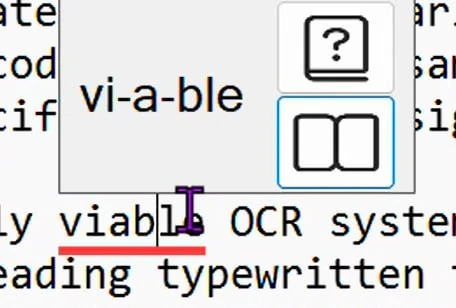
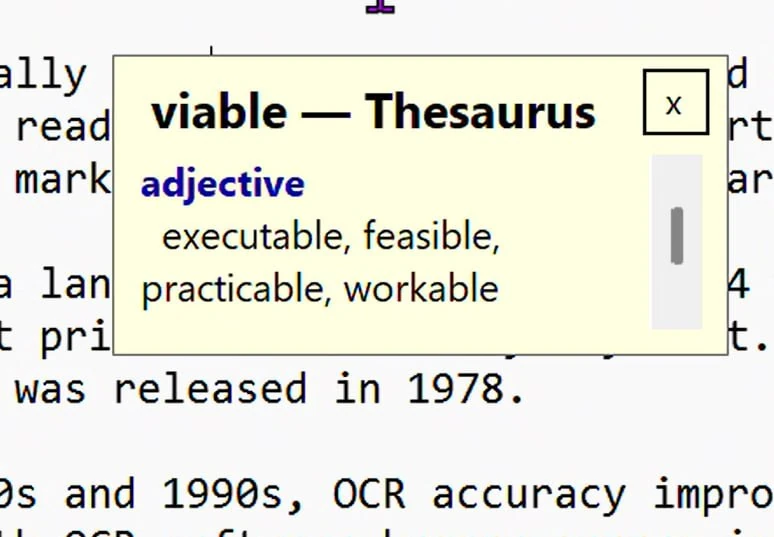
What the Thesaurus popup shows
- The headword, with pronunciation
- Part of speech (noun, verb, adjective, etc.)
- Synonyms grouped by meaning — different meanings produce different groups of synonyms
- Antonyms where applicable (e.g. for "happy", you'll see "sad", "miserable", "unhappy")
Using a synonym in your text
The Thesaurus popup is a reference — it shows you the synonyms but does not insert them into your document automatically. To use one, select the synonym in the popup, copy it (Ctrl+C), and paste it (Ctrl+V) in place of the original word in your document.
Working offline
The thesaurus is installed locally with Readable v3. Lookups happen instantly because there is no network round-trip. The same considerations as the offline dictionary apply — it works in exam environments, schools with strict filtering, and any time the internet is unavailable.
Universal app coverage in Readable v3
The Thesaurus works in any Windows application in Readable v3. Smart Dynamic OCR handles cases where the text is in an image or otherwise inaccessible.