
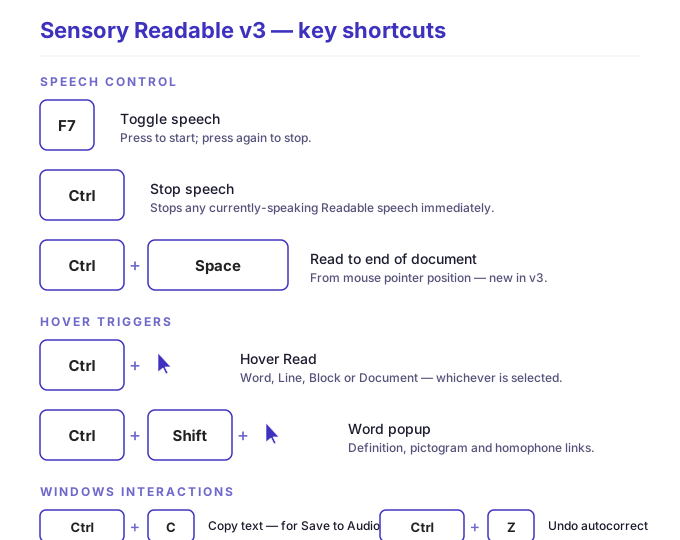
This page lists every keyboard shortcut in Sensory Readable v3, organised by what they do. Shortcuts work globally across Windows — you don't need the Readable toolbar to be in focus.
Speech control
- F7
- Toggle speech. Press to start speech (from cursor or selection); press again to stop. The simplest single-key control if you only want to remember one shortcut.
- Ctrl
- Stop speech. Stops any currently-speaking Readable speech immediately. Same effect as the toolbar Stop button.
- Ctrl+Space
- Read from mouse pointer to end of document. Hold Ctrl, position the mouse pointer where you want reading to start, press Space. Reading continues to the end of the document with auto-scroll.
Hover triggers
- Ctrl + hover (over text)
- Hover Read. The current Hover Read option (Word, Line, Block, or Document) determines how much text is read. Release Ctrl to stop.
- Ctrl+Shift + hover (over a word)
- Word Information popup. Speaks the word, shows definition, pictogram, and homophone links. Works in any application, including via Smart Dynamic OCR.
Common Windows shortcuts that interact with Readable
- Ctrl+C
- Standard Windows copy. Used to put text on the clipboard for Save to Audio (MP3) and other Readable features that work from the clipboard.
- Ctrl+Z
- Standard Windows undo. Reverts the most recent change, including unwanted autocorrections.
- Tab (after typing in any text field)
- Accepts the first word prediction suggestion (Windows 11 Prediction).
Mouse-based "shortcuts"
Several Readable actions are best driven by the mouse rather than keyboard — see:
- Hover Read Modes — Ctrl+hover for read-where-you-point
- Speak Text with 6-button mouse — assign hover and word-lookup triggers to mouse side buttons
- Click Stops Speech — hold any mouse button to pause speech
- Speak on Select — automatically speak text you select
Quick reference card
| Action | Shortcut |
|---|---|
| Start/stop speech (toggle) | F7 |
| Stop speech | Ctrl |
| Read to end of document | Ctrl+Space |
| Hover read | Ctrl+hover |
| Word Information popup | Ctrl+Shift+hover |
| Accept prediction (Windows 11) | Tab |
| Pause speech (gesture) | Hold any mouse button |
Print this page or bookmark it for reference. The shortcuts above are the most-used in everyday Readable use.