
Sensory Writeable for Windows is an offline writing companion application for Windows PCs. It uses an on-device large language model (LLM) to analyse your writing and provide detailed, structured feedback. All processing happens locally on your computer — your text is never sent to the internet.
What Sensory Writeable does
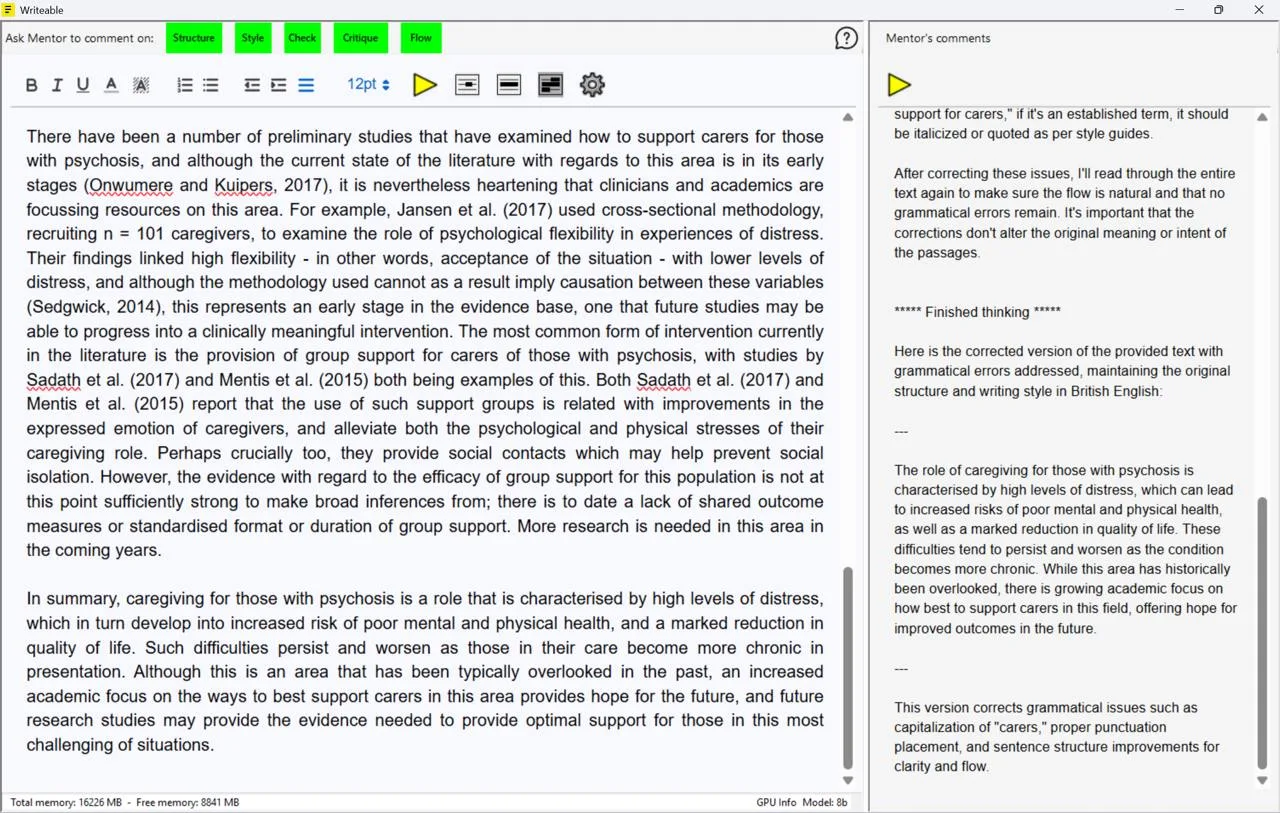
Writeable acts as a digital writing mentor. You paste, type, or dictate text into the left-hand input pane and select an analysis type. Writeable analyses the text and displays its commentary and suggestions in the right-hand comment pane. Writeable never changes your original document automatically — all suggestions are for you to consider and apply.
Five analysis types
Sensory Writeable for Windows provides five writing analysis commands — one more than the Mac version, which uses Apple Writing Tools for proofreading:
Organisation and logical flow of your writing
Vocabulary, tone, and sentence construction
AI proofreading of spelling and grammar
Comprehensive overall writing evaluation
Readability and transitions between ideas
Additional features
- Standard spellchecking — right-click underlined words for quick corrections
- Text formatting — Bold, Italic, Underline, font colour, highlighting, lists, and more
- Text-to-speech — hear your text and the AI suggestions read aloud
- UK English — suggestions in UK English, suited to academic and workplace writing