
Sensory Writeable includes a standard spellchecking function in the text input area. As you type, words that appear to be misspelled are underlined. Right-click any underlined word to see correction options.
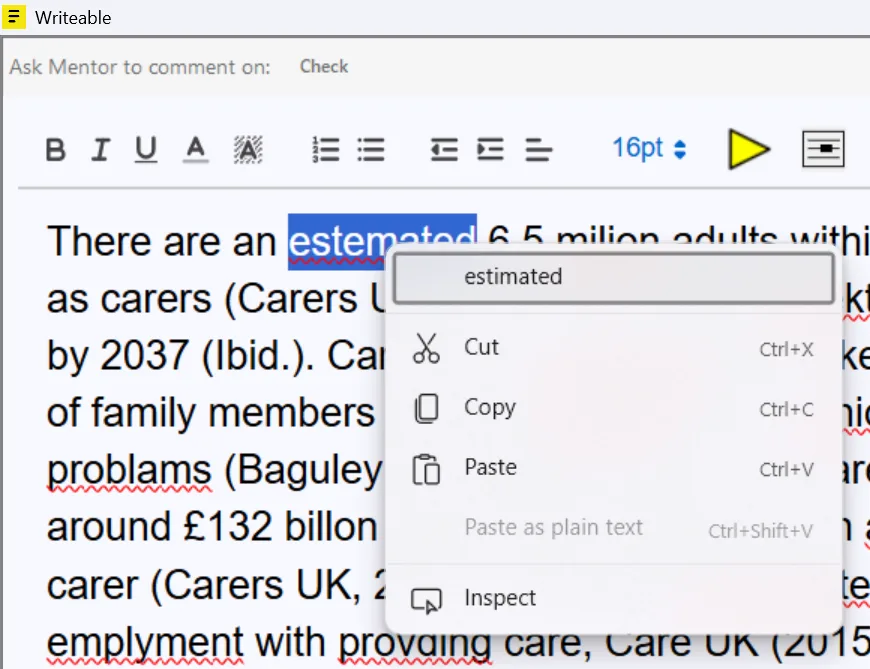
Using right-click spell corrections
- Type or paste your text into the Writeable input pane.
- Misspelled words appear underlined in red.
- Right-click an underlined word to see suggested corrections.
- Click a suggestion to replace the word.
Standard vs AI proofreading: Right-click spellchecking corrects individual words one at a time. For a comprehensive spelling, grammar, and phrasing review — including rephrasing of unclear sentences — use the Check command instead.
Writeable may also correct common spelling and grammar errors and suggest improved wording when running any analysis command. Review all suggested changes carefully before applying them to your own work, as Writeable may occasionally make modifications to wording to improve flow or style.