Welcome to Sensory Scribe for Windows. Scribe records meetings, lectures and events and creates an instant, high-accuracy text transcription of the audio. You can also add typed notes during a recording, and attach PDF or PowerPoint documents related to the presentation or meeting.
Scribe is an audio recording and instant transcription tool for Microsoft Windows 11. It uses Microsoft technology to create text transcriptions from the audio recording. Voice audio data is processed locally and is not shared to the cloud.
Recording consent: We advocate that permission for recording and transcription is announced and agreed with all parties prior to starting a recording.
Key features
- Instant real-time transcription — no internet connection required
- Audio recording saved as MP3 alongside the transcript
- Type notes alongside the live transcription during an event
- Attach and annotate PDF or PowerPoint documents during a session
- Review recordings with synchronised audio playback and transcript
- Search the full transcript and jump to any point in the audio
- Colour markers to flag important moments or different speakers
- Import recordings from the Scribe iOS companion app
- All data stays on your device — nothing is uploaded to any server
When Sensory Scribe loads
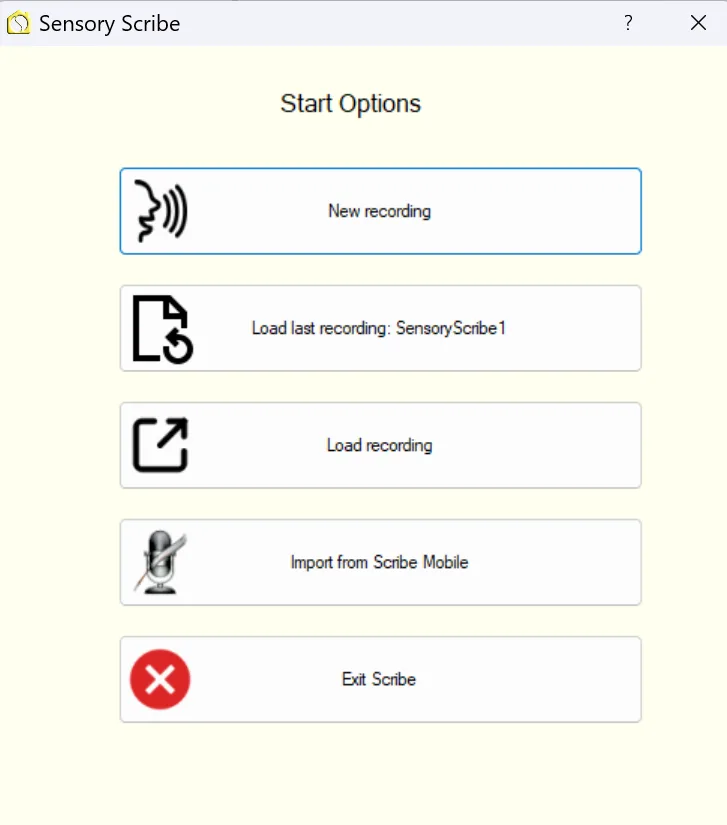
When Sensory Scribe is loaded you will see the Start Screen below, with options to create a new recording, load an existing recording, manage categories, and access settings.